A minimal, secure, and focused knowledge studio for the modern thinker.
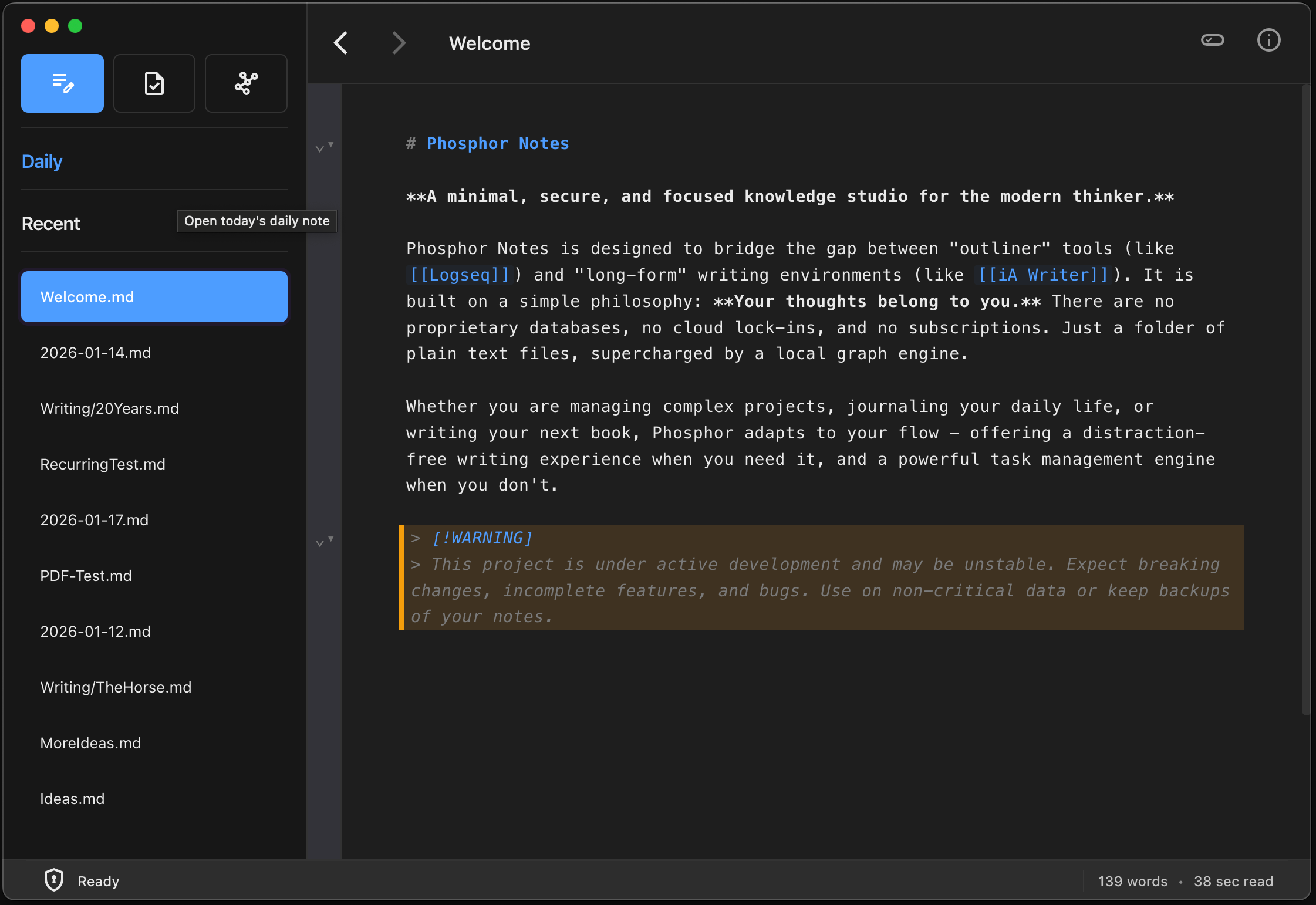
Phosphor Notes is designed to bridge the gap between “outliner” tools (like Logseq) and “long-form” writing environments (like iA Writer). It is built on a simple philosophy: Your thoughts belong to you. There are no proprietary databases, no cloud lock-ins, and no subscriptions. Just a folder of plain text files, supercharged by a local graph engine.
Whether you are managing complex projects, journaling your daily life, or writing your next book, Phosphor adapts to your flow - offering a distraction-free writing experience when you need it, and a powerful task management engine when you don’t.
Warning
This project is under active development and may be unstable. Expect breaking changes, incomplete features, and bugs. Use on non-critical data or keep backups of your notes.
Features
Personal Knowledge Management (PKM)
- Local First: All data is stored as plain Markdown (
.md) files on your hard drive. You own your data forever. - Wiki-Links: Connect thoughts instantly using
[[WikiLinks]]. Supports nested namespaces (e.g.,[[Projects/Phosphor/Roadmap]]). - The Graph: An integrated graph engine maps your knowledge, automatically generating Backlinks so you can see every page that references your current note. A rich graph visualization shows connections between notes.
- Omni-Search: A lightning-fast Command Palette (
Cmd+K) lets you fuzzy-search thousands of notes and jump to content instantly.
The Writer’s Studio
- Focus Mode: Toggle
Cmd+Dto fade away the UI, sidebar, and window chrome, leaving only your text. - Typewriter Scrolling: Keeps your active line vertically centered on the screen so you never have to crane your neck to look at the bottom of the monitor.
- Active Paragraph Dimming: Automatically dims inactive paragraphs, helping you focus strictly on the sentence you are writing right now.
- Predictive Text & Completion: An intelligent text prediction engine suggests word completions and next-word predictions based on your personal writing style and vocabulary.
- Live Stats: Unobtrusive word count and reading time metrics.
- Grammar & Style Checking: Real-time feedback on passive voice, sentence simplification, inclusive language, readability, profanities, and more - all customizable in preferences.
- Markdown Support: Full support for GitHub-Flavored Markdown (GFM) including tables, task lists, code blocks with syntax highlighting, footnotes, block folding, admonitions / callouts, and more.
- PDF & Image Embeds: Drag-and-drop images and PDFs directly into your notes. View images inline and expand PDFs into a full viewer.
Productivity Engine
- Tasks & Todo Lists: Manage tasks directly in your text using standard syntax (
- [ ],- [/],- [x]). - Recurring & Scheduled: Support for due dates and recurrence logic (e.g.,
📅 2026-01-15 🔁 +1w). - Task Dashboard: A dynamic view to aggregate and manage open tasks across your entire vault.
- Daily Journals: Automatic creation of daily notes (
YYYY-MM-DD.md) to capture fleeting thoughts and logs - in freeform or outliner mode.
Security & Architecture
- Zero-Knowledge Encryption: Optional, robust vault encryption using Argon2id (Key Derivation) and XChaCha20-Poly1305 (Authenticated Encryption). Your password is never stored; your data is unreadable without it.
- Rich Media: Drag-and-drop images (
.png,.jpg) directly into the editor. Assets are stored locally (and encrypted if the vault is locked). - Color Palettes: Three built-in themes (Snow, Amber, Green) inspired by the colors of classic CRT monitors, with light/dark modes.
- Logseq Importer: Seamlessly migrate your Logseq data (Markdown files with embedded metadata) into Phosphor Notes. This importer preserves backlinks, tags, and task statuses, and includes images and other attachments.
- File Shrink Backups: Automatic, time-stamped backups of files when saving smaller versions, reducing the risk of data loss (saved if the new content is more than 10% smaller).
- Performance: Built on Electron and React with a custom Node worker architecture to handle indexing thousands of files without UI lag.
- Cross-Platform: Designed for macOS initially, with plans for Windows and Linux support.